Code coverage

utPLSQL comes with a built-in coverage reporting engine. The code coverage reporting combines data from package DBMS_PROFILER and DBMS_PLSQL_CODE_COVERAGE. Code coverage is gathered for the following source types:
- package bodies
- type bodies
- triggers
- procedures
- functions
Note
The package and type specifications are excluded from code coverage analysis. This limitation is introduced to avoid false-negatives. Typically package specifications contain no executable code. The only exception is initialization of global constants and variables in package specification. Since most package specifications are not executable at all, there is no information available on the number of lines covered and those would be reported as 0% covered, which is not desirable.
To obtain information about code coverage for unit tests, run utPLSQL with one of built-in code coverage reporters. The following code coverage reporters are supplied with utPLSQL:
ut_coverage_html_reporter- generates a HTML coverage report providing summary and detailed information on code coverage. The HTML reporter is based on the open-source simplecov-html reporter for Ruby. It includes source code of the code that was covered (if the code is accessible for test user)ut_coverage_sonar_reporter- generates a Sonar Compatible XML coverage report providing detailed information on code coverage with line numbers. This coverage report is designed to be consumed by services like SonarQube and SonarCloudut_coverage_cobertura_reporter- generates a basic Cobertura coverage (http://cobertura.sourceforge.net/xml/coverage-04.dtd) report providing detailed information on code coverage with line numbers. This coverage report is designed to be consumed by services like TFS and Jenkins. Check this link for an example of XML generated by Java: https://raw.githubusercontent.com/jenkinsci/cobertura-plugin/master/src/test/resources/hudson/plugins/cobertura/coverage-with-data.xml
Security model
utPLSQL code coverage uses DBMS_PROFILER to gather information about the execution of code under test and therefore follows the DBMS_PROFILER's Security Model. In order to be able to gather coverage information, the user executing unit tests needs to be either:
- The owner of the code that is being tested
- Have the following privileges to be able to gather coverage on code owned by other users:
create any proceduresystem privilegeexecuteprivilege on the code that is being tested (not only the unit tests) orexecute any proceduresystem privilege
If you have execute privilege on the code that is being tested, but do not have create any procedure system privilege, then the code that is being tested will be reported as not covered (coverage = 0%).
If you have execute privilege only on the unit tests, but do not have execute privilege on the code that is being tested, the code will not be reported by coverage - as if it did not exist in the database.
If the code that is being tested is compiled as NATIVE, the code coverage will not be reported as well.
Manually running unit tests with coverage
Using the code coverage functionality is as easy as using any other reporter for the utPLSQL test-run. Run your tests from your preferred SQL tool and save the reporter results to a file.
All you need to do, is pass the constructor of the reporter to the ut.run procedure call.
Example:
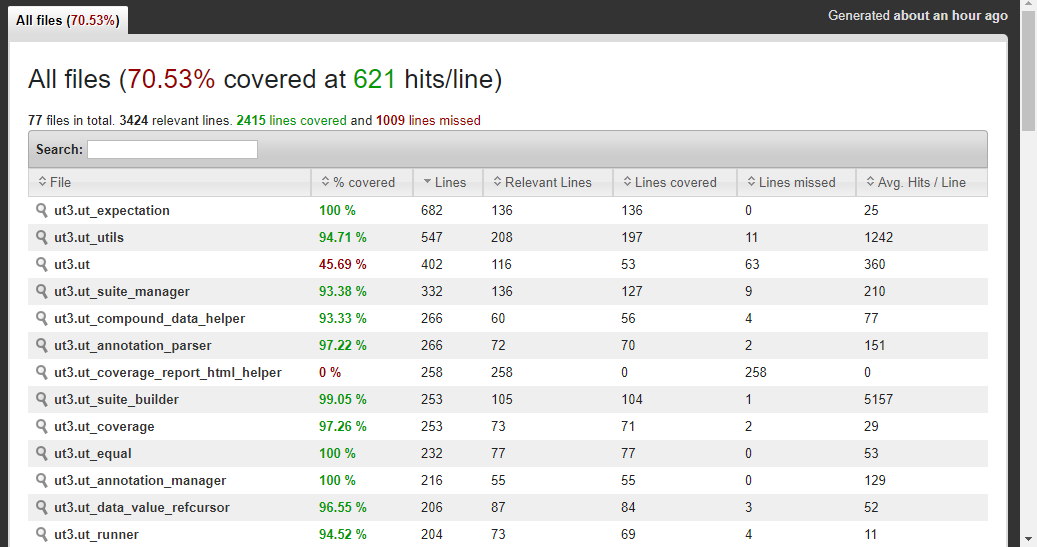
The above command executes all unit tests in the current schema, gathers information about code coverage for all sources in that schema and outputs the HTML report as text into DBMS_OUTPUT. Theut_coverage_html_reporter will produce an interactive HTML report. You can see a sample of code coverage for the utPLSQL project here
The report provides summary information with a list of source code that should be covered.
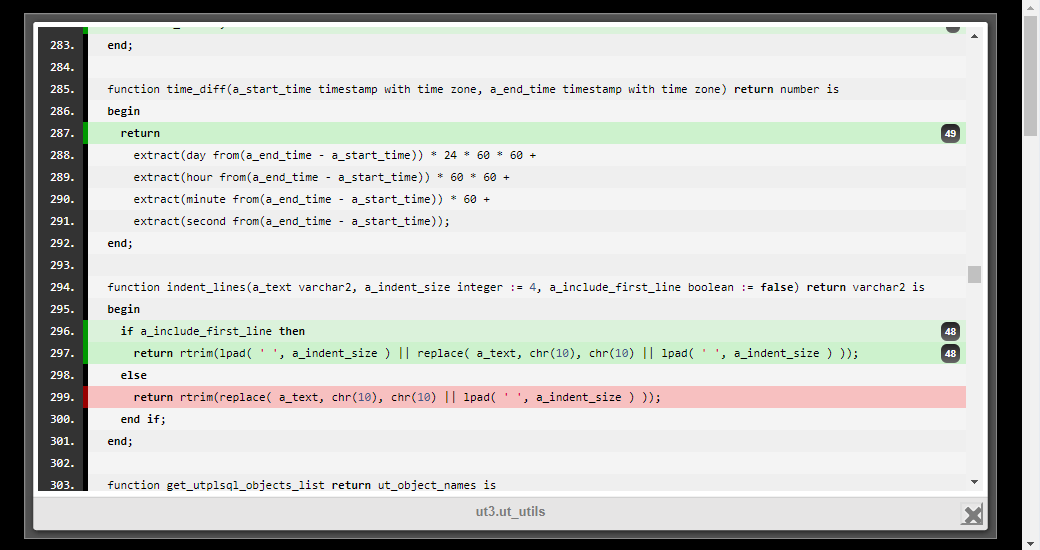
The report allow you to navigate to each source file and inspect line by line coverage.
Partial Coverage
What it does
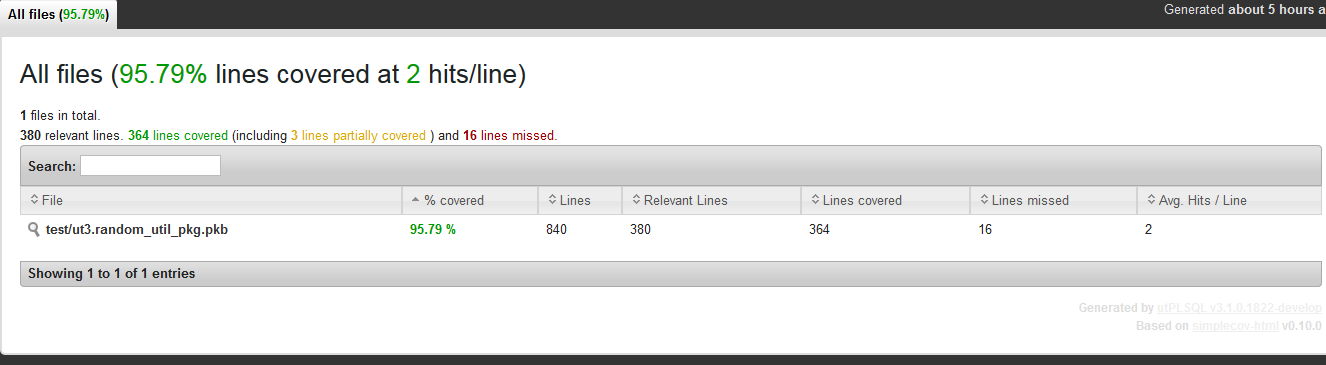
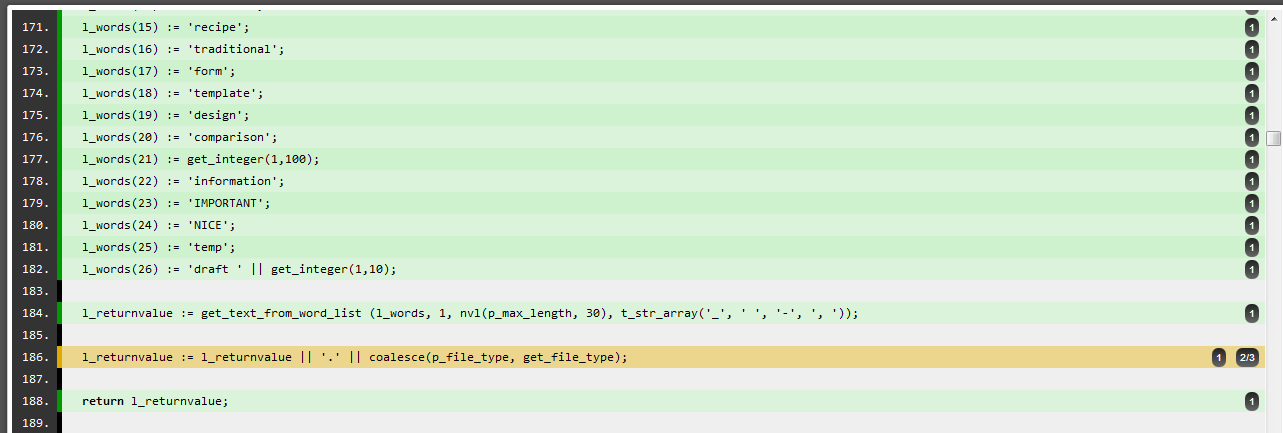
Partial coverage combines two data sources — the profiler and block coverage — to give you a more detailed picture of which parts of your code have been tested. When a line appears in both sources, and block coverage shows it was only partially covered, the display will reflect that: you'll see the line marked as partially covered, along with how many blocks on that line were executed out of the total.
Setup and permissions
utPLSQL automatically creates the tables required by Oracle's dbms_plsql_code_coverage package — you don't need to create them manually. Because of how dbms_plsql_code_coverage handles security, utPLSQL also takes care of granting access to those tables and creating the necessary synonyms. In a headless installation, both the grants and synonyms are made public, keeping things simple without requiring every utPLSQL user to set up their own tables.
Sample output:
Coverage reporting options
There are two distinct ways to gather code coverage: - Coverage on database schema(s) - Coverage on project files
Those two options are mutually exclusive and cannot be mixed. By default, when using one of coverage reporters, coverage is gathered on schema(s). The database schema(s) containing the tests that were executed during the run will be reported on by coverage reporter.
The parameters used to execute tests determine if utPLSQL will be using one approach or the other.
If parameter a_source_file_mappings or a_source_files is provided, then coverage is gathered on project files provided, otherwise coverage is gathered on schemas.
Note
Regardless of the options provided, all unit test packages are excluded from the coverage report. Coverage reports provide information only about the tested code.
The default behavior of coverage reporting can be altered using invocation parameters.
Schema based Coverage
To gather coverage for all objects in the current schema execute tests with coverage report as argument. This is the default reporting option and therefore additional coverage options don't need to be provided.
Note
When no filters are used, the size of the coverage report will depend two factors:
- the type of report (does the report include source code or not)
- the amount of source code in the database schema
Keep in mind that for schemas containing a lot of code, it can take quite some time to produce the coverage report.
Setting coverage schema(s)
By default, coverage is gathered on the schema(s) derived from suite paths provided to execute tests. This is a valid approach as long as your test packages and tested code share the same schema.
So when you run:
user_1 and user_2 objects.
If your tests live in a different schema from the tested code you may override the default behavior by providing an explicit list of coverage schema names.
In the example below, coverage will still be gathered for user_1 and user_2 objects, even thought we run the tests located in schema unit_test_schema
Filtering objects in coverage reports
By default, coverage is reported on all objects of the schema(s) described above. Several parameters narrow the scope of the coverage report. You can describe the scope with lists of names, or with regular expressions that match names.
| Parameter | Type | Meaning |
|---|---|---|
a_coverage_schemes |
ut_varchar2_list |
schemas to gather coverage on |
a_include_objects |
ut_varchar2_list |
[object_owner.]object_name to be included in the coverage report |
a_exclude_objects |
ut_varchar2_list |
[object_owner.]object_name to be excluded from the coverage report |
a_include_schema_expr |
varchar2(4000) |
regular expression, schemas whose name matches are included in the coverage report |
a_include_object_expr |
varchar2(4000) |
regular expression, objects whose name (without schema name) matches are included in the report |
a_exclude_schema_expr |
varchar2(4000) |
regular expression, schemas whose name matches are excluded from the coverage report |
a_exclude_object_expr |
varchar2(4000) |
regular expression, objects whose name (without schema name) matches are excluded from the report |
a_source_file_mappings |
ut_file_mappings |
map of filenames to database objects, used for file-based coverage - see Project based Coverage |
Use lists when the scope is a handful of known objects. Use regular expressions when the scope follows a naming convention,
for example all schemas that start with APP_, or all objects that end with _TMP.
A rule written once as a regular expression also covers the objects and schemas that are created later.
You may specify both include and exclude options to gain more control over what needs to be included / excluded from the coverage report. An object is reported when it passes the include filters and does not match any of the exclude filters.
Regular expressions
- The expression is evaluated by Oracle
REGEXP_LIKE. It is case-insensitive, soapp_matchesAPP_ORDERS. - A schema expression is matched against the schema name. An object expression is matched against the object name without the schema name.
- The expression is not anchored.
utilmatchesUT_UTILS,UTIL_TRAININGandERROR_UTIL_2. Use^to match from the beginning of the name and$to match up to the end, for example^app_or_tmp$. - When both an include schema expression and an include object expression are specified, an object must match both.
Which parameters are used when several are given
| If you specify | utPLSQL ignores |
|---|---|
a_source_file_mappings |
all other include/exclude parameters |
a_include_schema_expr or a_include_object_expr |
a_include_objects (and associated a_coverage_schemes) |
a_exclude_schema_expr or a_exclude_object_expr |
a_exclude_objects (and associated a_coverage_schemes) |
Everything else can be combined. In particular:
- include expressions can be combined with exclude expressions and with
a_exclude_objects, a_exclude_schema_expranda_exclude_object_exprcan be used together,- without include parameters, coverage is gathered on the schemas described in Setting coverage schema(s) and the exclude parameters remove objects from that scope.
Important note
The order of priority is for evaluation of include/exclude filter parameters is as follows.
- if a_source_file_mappings is defined then all include/exclude parameters are ignored (see section below for usage of a_source_file_mappings parameter )
- else if a_include_schema_expr or a_include_object_expr parameter is specified then parameters a_coverage_schemes and a_include_objects are ignored
- else if a_include_objects is specified then the coverage is gathered only on specified database objects.
- if a_coverage_schemes is specified then those schemas are used for objects without schema name in a_include_objects and a_exclude_objects
- if a_coverage_schemes is not specified then schema from paths (a_paths) parameter are used for objects without schema name in a_include_objects and a_exclude_objects
- else if, only the a_coverage_schemes is specified then the coverage is gathered only on specified database schemas
- else if no coverage specific parameters are provided coverage is gathered on all schemas specified in paths passed to run procedure
- else if no paths were specified, the coverage is gathered on current schema of the session running the tests
Examples
The examples use a system split into schemas app_orders and app_billing that contain the application code,
and schemas app_orders_test and app_billing_test that contain the unit tests.
Filtering by lists of names
Example: Limiting coverage by object name, for tested code located in the same schema as the unit tests.
user_1 and user_2. Coverage will only be reported on objects user_1.award_bonus, user_2.award_bonus
Example: Limiting coverage by object name, for tested code located in different schemas than the unit tests.
unit_test_schema. Coverage will only be reported on objects user_1.award_bonus, user_2.award_bonus, user_1.betwnstr, user_2.betwnstr.
Objects that do not exist in the database but were specified in a_include_objects will be ignored.
Example: Limiting coverage by object owner and name.
unit_test_schema. Coverage will only be reported on objects user_1.award_bonus, user_2.betwnstr
The a_exclude_objects can be used in the same way as a_include_objects.
Example: Excluding objects from coverage report by providing a list of object owner/name to be excluded.
test_award_bonus in schema unit_test_schema. Coverage will be reported on all objects in schema ut3_user except the betwnstr object.
Filtering by regular expressions
Example: Tests are located in other schemas than the application code. Report coverage on the application schemas, selected by a pattern.
app_orders_test and app_billing_test.
Coverage will be reported on all objects in the schemas app_orders and app_billing, even though those schemas are not mentioned in the paths.
Any other schema whose name matches the expression is reported as well.
Example: Include all application schemas and exclude the test schemas, using one include and one exclude expression.
app_ except the ones whose name ends with _test.
When a new schema app_shipping is created, it is included without any change to the call.
Example: Report coverage on one functional area of a schema, identified by a naming convention.
app_orders whose name starts with ord_ or invoice_.
Example: Keep generated and temporary objects out of the coverage report.
app_orders given in a_coverage_schemes.
Objects whose name ends with _tmp or _gen are left out.
Example: Use an expression for the bulk of the scope and a list for the exceptions.
app_orders except for ord_legacy.
The list can be used with an include expression. It would be ignored if an exclude expression was given too.
Note
An include object expression used without an include schema expression is not limited to the schemas of your tests.
It is applied to the objects of all schemas visible to the user running the tests, for example a_include_object_expr => '^ord_'
also reports objects named ord_... in other schemas. Add a_include_schema_expr to keep the scope where you want it.
Note
Filtering using a_include_objects and a_exclude_objects is only applicable when gathering coverage for a schema. Those filters are not applied when reporting coverage on project files.
The same is true for the expression parameters.
Note
When running coverage on schema objects, all source code of package bodies, functions, procedures, type bodies and triggers that were not executed will be reported as having 0% code coverage and all source code lines will show as uncovered. This is different from the behavior when gathering coverage on project files.
Using the filters from utPLSQL-cli and the Maven plugin
The filter options described above are available in utPLSQL-cli and in the utPLSQL-maven-plugin, and the same rules apply (which options are ignored when several are given, how expressions are matched, and that the filters are not applied when coverage is gathered on project files). See the documentation of those tools for the list of supported options and their names.
Project based Coverage
utPLSQL provides reporters that produce reports consumable by external tools like Sonar/SonarCloud.
Services like Sonar and others perform analysis based on source code in project files. They are abstracted from database, schema names, packages, procedures and functions, and operate on a more generic concept of project source code.
To be able to effectively use reporters dedicated for those tools, utPLSQL provides functionality for mapping database object names to project files.
There are a few significant differences when running coverage on project files compared to running coverage on schema(s).
- Coverage is only reported on objects that were successfully mapped to project files.
- Project files (database objects) that were not executed at all are not reported as fully uncovered. It is up to the consumer (Sonar) to determine if project file should be considered as 0% coverage or just ignored.
In order to successfully use coverage on project files, those files must be mapped to database objects.
Though you can gather project based code coverage directly using exec ut.run(...), it is highly recommended to use utPLSQL-cli command line client.
The examples below are using utPLSQL-cli to execute tests and gather coverage information.
File mapping using default parameters
The example below illustrates a directory structure supported by the default parameters of utPLSQL. The structure represents a multi-schema project with file names indicating object owner.
C:
  \my_project
    \sources
      \hotel.add_rooms_content.prc
      \hotel.remove_rooms_by_name.prc
      \hotel.rooms.tbl
      \hr.award_bonus.prc
      \hr.betwnstr.fnc
      \hr.employees_test.tbl
    \tests
      \hotel.test_add_room_content.pkb
      \hotel.test_add_room_content.pks
      \hotel.test_remove_rooms_by_name.pkb
      \hotel.test_remove_rooms_by_name.pks
      \hr.test_award_bonus.pkb
      \hr.test_award_bonus.pks
      \hr.test_betwnstr.pkb
      \hr.test_betwnstr.pks
By default, utPLSQL will convert file paths into database objects using the following regular expression /(((\w|[$#])+)\.)?((\w|[$#])+)\.(\w{3})$
- object owner (if it is present) is identified by the expression in the second set of brackets
- object name is identified by the expression in the fourth set of brackets
- object type is identified by the expression in the sixth set of brackets
Note
utPLSQL will replace any '\' with '/' for the purpose of mapping files to objects. The paths shown in the results will remain (contain '\' where it was present). This is done to simplify the syntax of regular expressions. Regular expression will always use '/' as a directory separator on a file path regardless of whether you're on a Windows or Unix system.
Note
Below examples assume that you have downloaded latest version of utPLSQL-cli and extracted it into your projects root directory and that you run the utPLSQL-cli from that directory.
Windows:
utPLSQL-cli\bin\utplsql run test_runner/pass@db_host:db_port/db_service_name ^
 -p=hr,hotel ^
 -source_path=sources ^
 -test_path=tests ^
 -f=ut_coverage_html_reporter -o=coverage.html ^
 -f=ut_sonar_test_reporter    -o=test_results.xml
Bash:
utPLSQL-cli/bin/utplsql run test_runner/pass@db_host:db_port/db_service_name \
 -p=hr,hotel \
 -source_path=sources \
 -test_path=tests \
 -f=ut_coverage_html_reporter -o=coverage.html \
 -f=ut_sonar_test_reporter    -o=test_results.xml
The above commands will:
- connect as user
test_runner - run all utPLSQL v3 tests for users
hr,hotel - map database code to project files in
sourcesdirectory and save code coverage results intocoverage.html - map test packages to project files in
testsdirectory and save test results intotest_results.xml
To better understand the default regular expression used, have a look here.
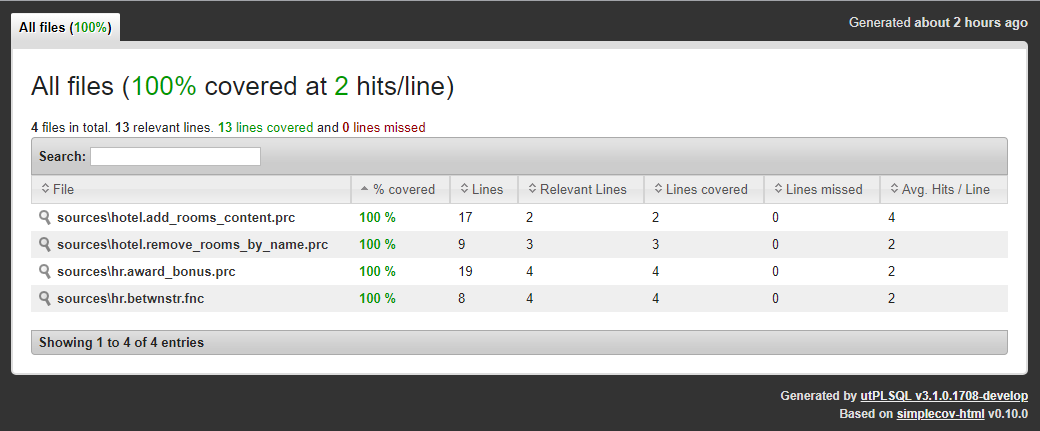
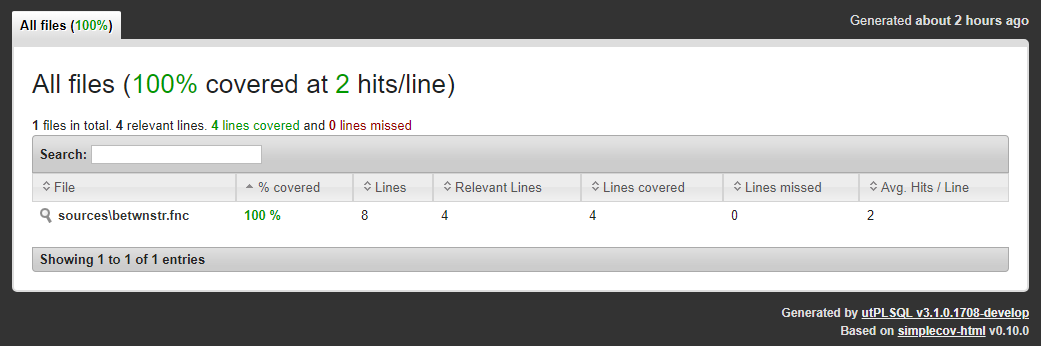
Tested code is mapped to files in coverage.html
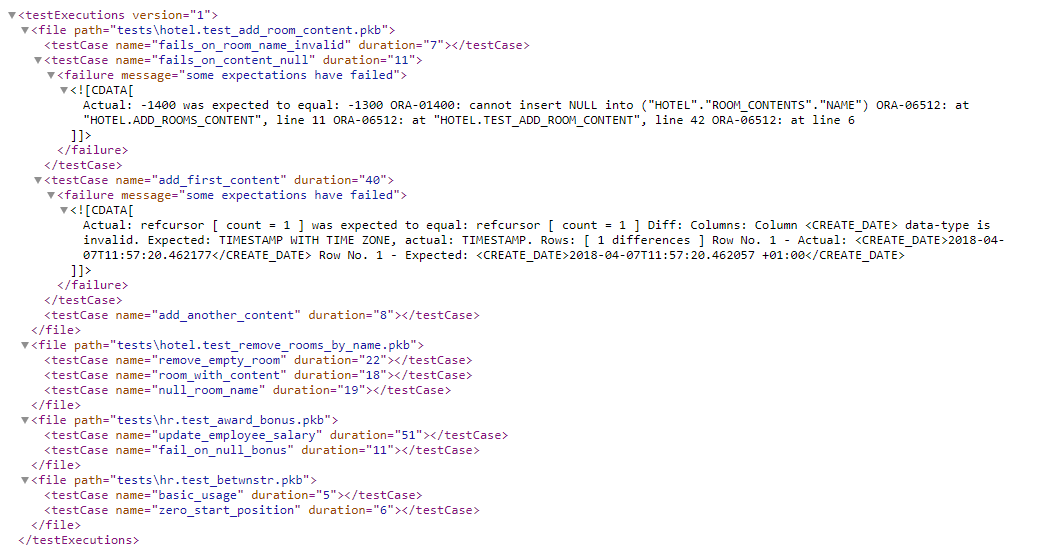
Unit test code is mapped to files in test_results.xml
Using custom regular expressions
If your project directory structure is different, you can use additional configuration parameters to tell utPLSQL how the project files are to be mapped into database objects.
Example: Using custom regular expressions on a multi-schema project with separate directories for each object owner.
C:
  \my_project
    \sources
      \hotel
        \add_rooms_content.prc
        \remove_rooms_by_name.prc
        \rooms.tbl
      \hr
        \award_bonus.prc
        \betwnstr.fnc
        \employees_test.tbl
    \tests
      \hotel
        \test_add_room_content.pkb
        \test_add_room_content.pks
        \test_remove_rooms_by_name.pkb
        \test_remove_rooms_by_name.pks
      \hr
        \test_award_bonus.pkb
        \test_award_bonus.pks
        \test_betwnstr.pkb
        \test_betwnstr.pks
The command below will gather coverage and map files to database objects using custom regular expression.
Note that the owner/name/type subexpressions don't need to be explicitly specified if they are same as default values ( 2/3/4 ).
In the below example, they were specified explicitly only for source_path, test_path doesn't have subexpressions specified and so they are default (2/3/4).
Windows:
utPLSQL-cli\bin\utplsql run test_runner/pass@db_url ^
 -p=hr,hotel ^
 -source_path=sources ^
 -regex_expression="/((\w+)/)?(\w+)\.(\w{3})$" ^
 -owner_subexpression=2 ^
 -name_subexpression=3 ^
 -type_subexpression=4 ^
 -test_path=tests -regex_expression="/((\w+)/)?(\w+)\.(\w{3})$" ^
 -f=ut_coverage_html_reporter -o=coverage.html ^
 -f=ut_sonar_test_reporter -o=test_results.xml ^
Bash:
utPLSQL-cli/bin/utplsql run test_runner/pass@db_url \
 -source_path=sources \
 -regex_expression="/((\w+)/)?(\w+)\.(\w{3})$" \
 -owner_subexpression=2 \
 -name_subexpression=3 \
 -type_subexpression=4 \
 -test_path=tests -regex_expression="/((\w+)/)?(\w+)\.(\w{3})$" \
 -owner_subexpression=2 \
 -name_subexpression=3 \
 -type_subexpression=4 \
 -f=ut_coverage_html_reporter -o=coverage.html \
 -f=ut_sonar_test_reporter -o=test_results.xml
You can specify different mapping rules for source files and for test files - see utPLSQL-cli readme for details.
To better understand the regular expression used, have a look here.
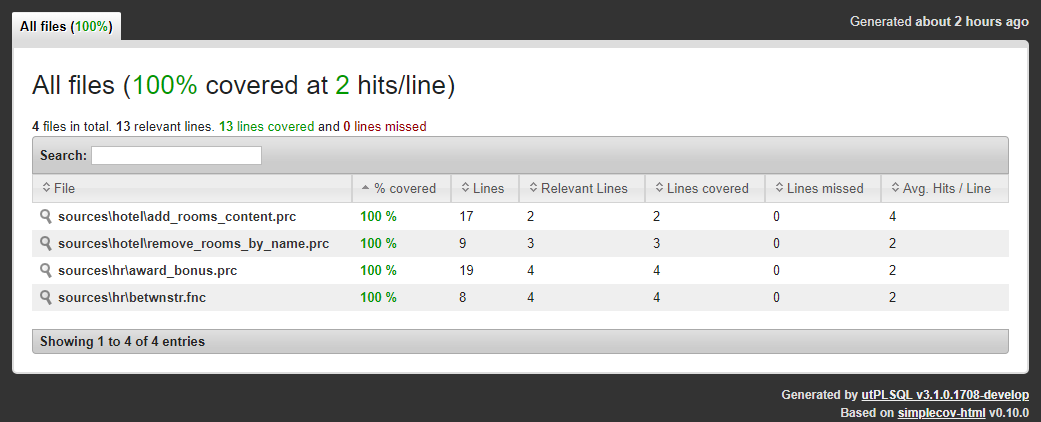
Tested code is mapped to files in coverage.html
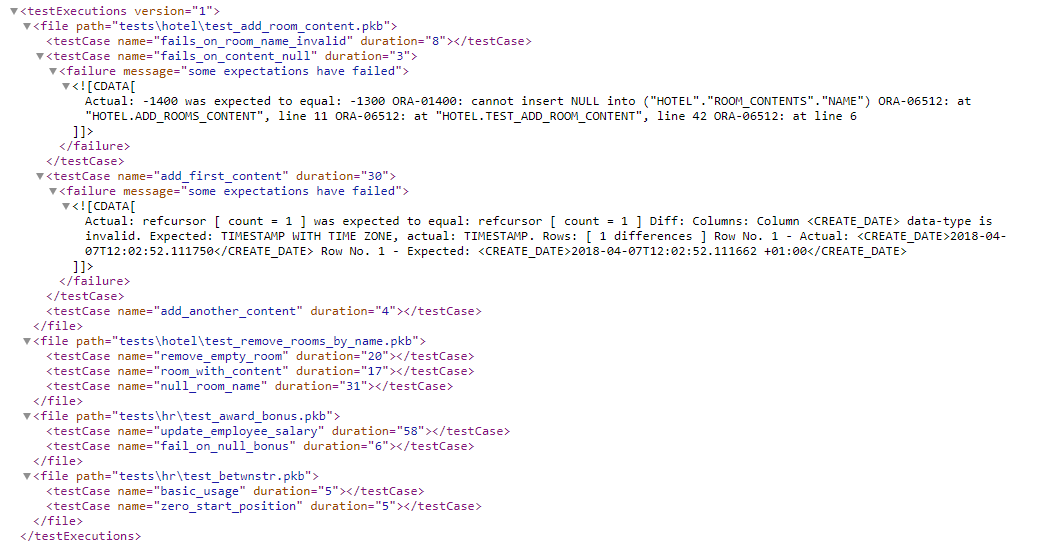
Unit test code is mapped to files in test_results.xml
Explicitly specifying object owner
When dealing with projects that operate within a single schema the project structure probably doesn't indicate the owner. In such scenarios, you can explicitly specify the object owner for both tests and source code.
Example: Single-schema project - no indication of object owner
The command below will gather coverage and map files to database objects.
For the database objects mapped to souces directory user code_owner will be used.
For the database objects mapped to tests directory user tests_owner will be used.
Windows:
utPLSQL-cli\bin\utplsql run test_runner/pass@db_url ^
 -p=tests_owner ^
 -source_path=sources -owner=code_owner ^
 -test_path=tests     -owner=tests_owner ^
 -f=ut_coverage_html_reporter -o=coverage.html ^
 -f=ut_sonar_test_reporter    -o=test_results.xml
Bash:
utPLSQL-cli/bin/utplsql run test_runner/pass@db_url \
 -p=tests_owner \
 -source_path=sources -owner=code_owner \
 -test_path=tests     -owner=tests_owner \
 -f=ut_coverage_html_reporter -o=coverage.html \
 -f=ut_sonar_test_reporter    -o=test_results.xml
Note
When the project folder structure does not provide any information about source code owner and test owner, you can specify the owner for tests and owner for code explicitly. Such project configuration supports only single-owner for source code and single owner for tests.
Tested code is mapped to files in coverage.html
Unit test code is mapped to files in test_results.xml

Custom mapping of object types
By default, when mapping project files to database objects, utPLSQL will identify the object type by file extension.
The table below represents the default mapping of file extensions to database object types.
| file extension | object type |
|---|---|
| tpb | type body |
| pkb | package body |
| bdy | package body |
| trg | trigger |
| fnc | function |
| prc | procedure |
If your project naming convention differs and your file extensions do not match the above, or you simply name all of your files with .sql suffix, you can still use utPLSQL, but you need to provide custom mapping for object types.
Example: Multi-schema project with separate directories for each object owner and object type
C:
  \my_project
    \sources
      \hotel
        \functions
        \packages
        \packages_bodies
        \procedures
          \add_rooms_content.sql
          \remove_rooms_by_name.sql
        \tables
          \rooms.sql
        \triggers
        \types
        \type_bodies
      \hr
        \functions
          \betwnstr.sql
        \packages
        \package_bodies
        \procedures
          \award_bonus.sql
        \tables
          \employees_test.sql
        \triggers
        \types
        \types_bodies
    \tests
      \hotel
        \packages
          \test_add_room_content.sql
          \test_remove_rooms_by_name.sql
        \packages_bodies
          \test_add_room_content.sql
          \test_remove_rooms_by_name.sql
      \hr
        \packages
          \test_award_bonus.sql
          \test_betwnstr.sql
        \packages_bodies
          \test_award_bonus.sql
          \test_betwnstr.sql
Windows:
utPLSQL-cli\bin\utplsql run test_runner/pass@db_url ^
 -p=hr,hotel ^
 -source_path=sources ^
 -regex_expression="/(\w+)/(\w+)/(\w+)\..{3}$" ^
 -type_mapping="packages_bodies=PACKAGE BODY/types_bodies=TYPE BODY/triggers=TRIGGER/procedures=PROCEDURE/functions=FUNCTION" ^
 -owner_subexpression=1 ^
 -name_subexpression=3 ^
 -type_subexpression=2 ^
 -test_path=tests -regex_expression="/(\w+)/(\w+)/(\w+)\..{3}$" ^
 -type_mapping="packages_bodies=PACKAGE BODY/types_bodies=TYPE BODY/triggers=TRIGGER/procedures=PROCEDURE/functions=FUNCTION" ^
 -owner_subexpression=1 ^
 -name_subexpression=3 ^
 -type_subexpression=2 ^
 -f=ut_coverage_html_reporter -o=coverage.html ^
 -f=ut_sonar_test_reporter -o=test_results.xml
Bash:
utPLSQL-cli/bin/utplsql run test_runner/pass@db_urll \
 -p=hr,hotel \
 -source_path=sources \
 -regex_expression="/(\w+)/(\w+)/(\w+)\..{3}$" \
 -type_mapping="packages_bodies=PACKAGE BODY/types_bodies=TYPE BODY/triggers=TRIGGER/procedures=PROCEDURE/functions=FUNCTION" \
 -owner_subexpression=1 \
 -name_subexpression=3 \
 -type_subexpression=2 \
 -test_path=tests -regex_expression="/(\w+)/(\w+)/(\w+)\..{3}$" \
 -type_mapping="body=PACKAGE BODY/type_body=TYPE BODY/trigger=TRIGGER" \
 -owner_subexpression=1 \
 -name_subexpression=3 \
 -type_subexpression=2 \
 -f=ut_coverage_html_reporter -o=coverage.html \
 -f=ut_sonar_test_reporter -o=test_results.xml
The parameter type_mapping accepts a list of a key-value pairs representing a mapping of regex subexpression to database object type.
To better understand the regular expression used, have a look here.
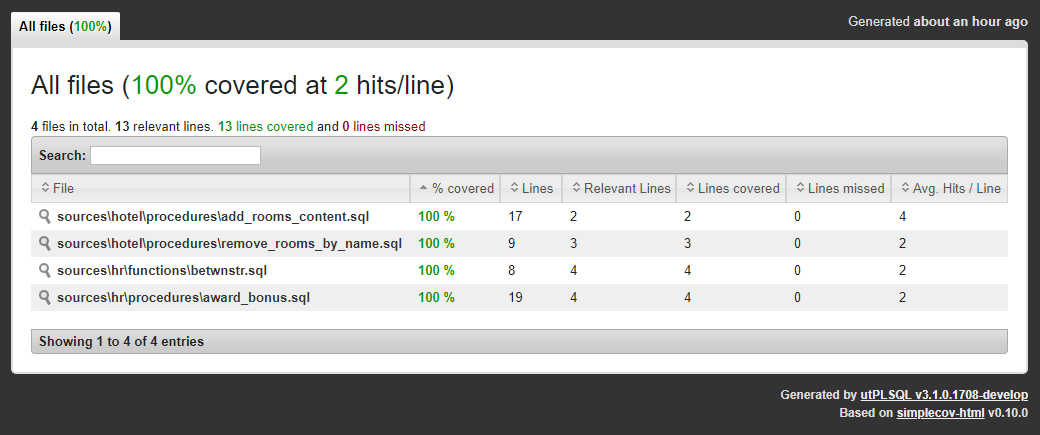
Tested code is mapped to files in coverage.html
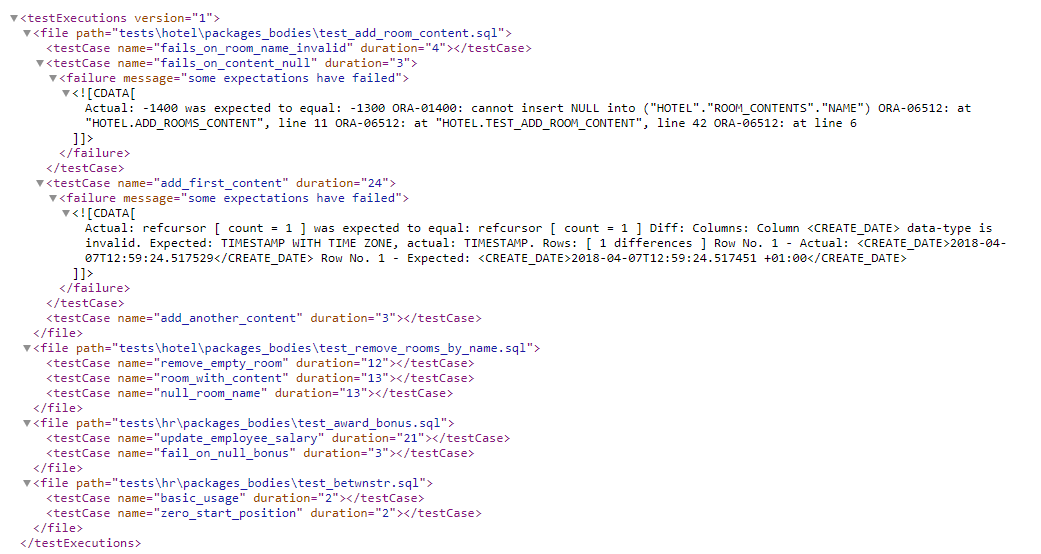
Unit test code is mapped to files in test_results.xml
Object-file mapping rules
In order to allow deterministic and accurate mapping of database source-code into project files, the project directory and file structure needs to meet certain criteria.
- Source code is kept separate from test code (separate directories)
- Each database (source-code) object is stored in an individual file. Package/type specification is kept separate from its body.
- File name (file path) contains the name of database object
- Each file-path clearly identifies object type (by file extension)
- Each file contains representation of database object "as is". No extra commands (like
set echo offALTER SESSION SET PLSQL_CCFLAGS = 'debug:TRUE';) or blank lines are present beforeCREATE TYPE,CREATE TYPEetc. - When project is spanning across multiple database schemes, each file-path clearly and uniformly identifies object owner
File mapping from SQL
The ut.run command provides interface to map project into database objects when executing tests.
While it is much easier to perform mapping directly from command line, it is possible to achieve similar functionality from any SQL client.
The main differences when using the ut.run(...) command, will be:
- you can only use single reporter and therefore will get only one report from test execution
- you need to provide fill list of project files rather than point to
sourcesandtestsdirectories
Example project directory structure.
C:
  \my_project
    \sources
      \hotel
        \functions
        \packages
        \packages_bodies
        \procedures
          \add_rooms_content.sql
          \remove_rooms_by_name.sql
        \tables
          \rooms.sql
        \triggers
        \types
        \type_bodies
      \hr
        \functions
          \betwnstr.sql
        \packages
        \package_bodies
        \procedures
          \award_bonus.sql
        \tables
          \employees_test.sql
        \triggers
        \types
        \types_bodies
    \tests
      \hotel
        \packages
          \test_add_room_content.sql
          \test_remove_rooms_by_name.sql
        \packages_bodies
          \test_add_room_content.sql
          \test_remove_rooms_by_name.sql
      \hr
        \packages
          \test_award_bonus.sql
          \test_betwnstr.sql
        \packages_bodies
          \test_award_bonus.sql
          \test_betwnstr.sql
To execute all tests and map database source code into source file names you could use the following command in any SQL client:
To execute all tests and map database tests code into test file names you could use the following command in any SQL client:
Reporting coverage outside utPLSQL and in parallel sessions
utPSLQL allows fo standalone reporting code coverage across multiple database sessions. This functionality enables coverage reporting for external testing tools.
Following API calls enable the standalone coverage reporting.
ut_runner.coverage_start( coverage_run_id );- initiates code coverage within a sessionut_runner.coverage_stop();- stops gathering of code coverage within a session.get_report( ... )- coverage reporters function producing coverage report as pipelined data-set (to be used in SQL query).get_report_cursor( ... )- coverage reporters function producing coverage report as ref-cursor
Example:
Specification of parameters for get_report and get_report_cursor
The a_client_character_set is used to provide character set to the report. Coverage reports in XML and HTML format include this information to assure that HMTL/XML encoding tag is aligned with encoding of the report produced.
Use this parameter to provide encoding of your client application.
The a_coverage_options parameter is used to control the scope and formatting of data returned by report.
ut_coverage_options object accepts the following arguments
coverage_run_id- identifier of coverage run to generate report for - data-typeRAW(32)schema_names- optional - list of schema names to include in coverage report - data-typeUT_VARCHAR2_ROWSexclude_objects- optional - list of object names to exclude from report - data-typeUT_VARCHAR2_ROWSinclude_objects- optional - list of object names to gather coverage on - data-typeUT_VARCHAR2_ROWSfile_mappings- optional - list of schema names to gather coverage on - data-typeUT_FILE_MAPPINGSinclude_schema_expr- optional - regular expression to match against schema name to include in coverage - data-typeVARCHAR2(4000)include_object_expr- optional - regular expression to match against object name to include in coverage - data-typeVARCHAR2(4000)exclude_schema_expr- optional - regular expression to match against schema name to exclude in coverage - data-typeVARCHAR2(4000)exclude_object_expr- optional - regular expression to match against object name to exclude in coverage - data-typeVARCHAR2(4000)
coverage_run_id parameter identifies a common coverage run. The valid value type for that parameter is RAW(32).
It is recommended to use sys_guid() to generate a common, unique identifier for a specific coverage run.
If the identifier is not unique, previous runs of coverage that used the same coverage_run_id will be aggregated to the resulting coverage report.
For details on the meaning of schema_names, exclude_objects, include_objects, file_mappings see sections above.
Note that data-types of include/exclude/schema lists are different when calling ut.run vs. calling get_report/get_report_cursor.